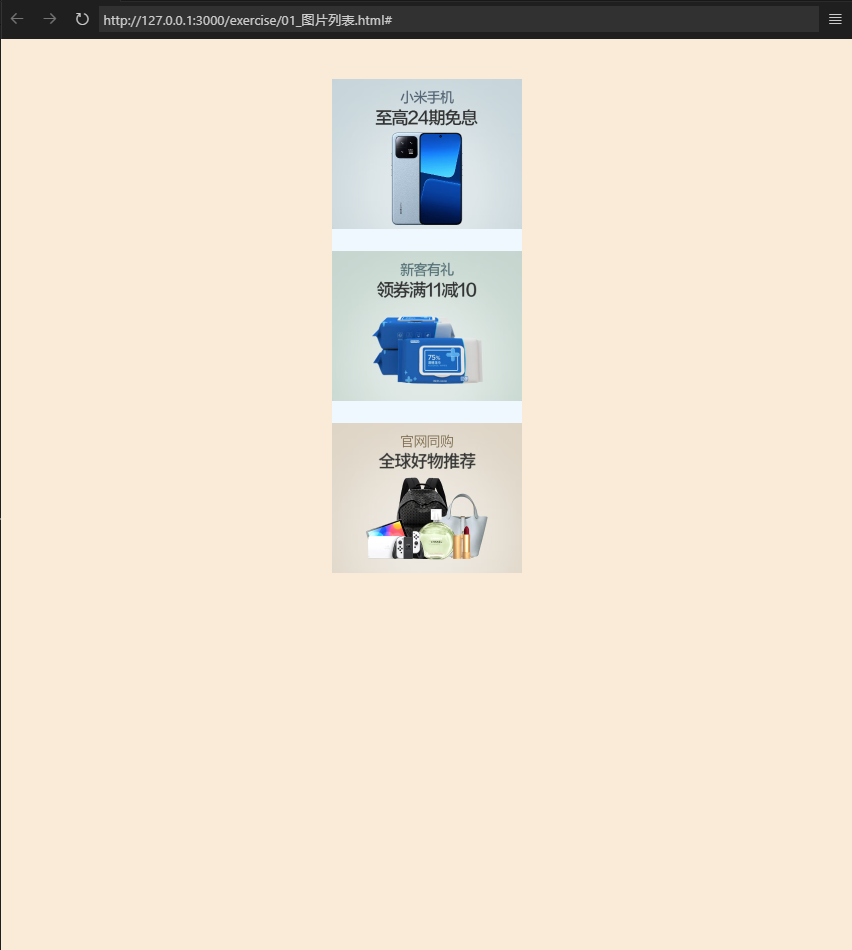
2024-02-11发表2024-10-24更新前端 / CSS4 分钟读完 (大约631个字)css_exerciseexercise exercise_1-京东图片列表123456789101112131415161718192021222324252627282930313233343536373839404142434445464748495051525354555657<!DOCTYPE html><html lang="en"><head> <meta charset="UTF-8"> <meta name="viewport" content="width=device-width, initial-scale=1.0"> <title>图片列表</title> <!-- 引入css,去除预设值的css样式 --> <link rel="stylesheet" href="./css/reset.css"> <style> /* 设置背景方便观察 */ body{ background-color:antiquewhite; } ul{ width: 190px; height: 470px; /* 居中对齐 */ margin: 40px auto; /* 设置背景颜色 */ background-color: aliceblue; } ul li:not(:last-child){ /* 设置li之间的外边距 */ /* 除掉最后一个孩子元素其他元素下边距为20px */ margin-bottom: 20px; } ul>li img{ /* 这里只需要修改宽度为父元素百分百,css自动按照图片原比例缩小 */ width: 100%; } </style></head><body> <ul> <li> <a href="#"> <img src="./img1/01.png.avif" alt=""> </a> </li> <li> <a href="#"> <img src="./img1/02.png.avif" alt=""> </a> </li> <li> <a href="#"> <img src="./img1/03.jpg.avif" alt=""> </a> </li> </ul></body></html> 效果: exercise_2-京东文字列表123456789101112131415161718192021222324252627282930313233343536373839404142434445464748495051525354555657585960616263646566676869707172737475767778798081828384858687888990919293949596979899100101102103104105106107108109110111112113114115116117118119120121122123124125126127128129130131132133134135136137138139140141<!DOCTYPE html><html lang="en"><head> <meta charset="UTF-8"> <meta name="viewport" content="width=device-width, initial-scale=1.0"> <title>文字列表</title> <!-- 清除默认样式 --> <link rel="stylesheet" href="./css/reset.css"> <style> /* 设置网页背景 */ body{ background-color: bisque; } .left-nav{ width: 200px; height: 300px; background-color: azure; /* 居中 */ margin: 20px auto; /* 设置内边距 */ padding: 10px 0px; } .left-nav .item{ height: 25px; /* 要让一个文字再父元素中垂直居中,只需将父元素的line-height设置为同父元素一个值就好 */ line-height: 25px; /* 设置margin向右移动item的阴影覆盖不到 */ padding: 0px 8px; } .item:hover{ background-color: #d9d9d9; } /* 设置超链接样式 */ a{ text-decoration: none; font-size: 14px; color: #333; } a:hover{ color: #c81623; } .item span{ padding: 0 2px; } </style></head><body> <div class="left-nav"> <div class="item"> <a href="#">手机</a> <span>/</span> <a href="#">运营商</a> <span>/</span> <a href="#">数码</a> </div> <div class="item"> <a href="#">电脑</a> <span>/</span> <a href="#">办公</a> </div> <div class="item"> <a href="#">家具</a> <span>/</span> <a href="#">家居</a> <span>/</span> <a href="#">家装</a> <span>/</span> <a href="#">厨具</a> </div> <div class="item"> <a href="#">男装</a> <span>/</span> <a href="#">女装</a> <span>/</span> <a href="#">童装</a> <span>/</span> <a href="#">内衣</a> </div> <div class="item"> <a href="#">美妆</a> <span>/</span> <a href="#">个护清洁</a> <span>/</span> <a href="#">宠物</a> </div> <div class="item"> <a href="#">女鞋</a> <span>/</span> <a href="#">箱包</a> <span>/</span> <a href="#">钟表</a> </div> <div class="item"> <a href="#">男鞋</a> <span>/</span> <a href="#">运动</a> <span>/</span> <a href="#">户外</a> </div> <div class="item"> <a href="#">房产</a> <span>/</span> <a href="#">汽车</a> <span>/</span> <a href="#">汽车用品</a> </div> <div class="item"> <a href="#">母婴</a> <span>/</span> <a href="#">玩具乐器</a> </div> <div class="item"> <a href="#">食品</a> <span>/</span> <a href="#">酒类</a> <span>/</span> <a href="#">生鲜</a> <span>/</span> <a href="#">特产</a> </div> <div class="item"> <a href="#">艺术</a> <span>/</span> <a href="#">礼品鲜花</a> <span>/</span> <a href="#">农牧园艺</a> </div> <div class="item"> <a href="#">京东买药</a> <span>/</span> <a href="#">计生情趣</a> </div> </div></body></html> exercise_3-网易新闻列表123456789101112131415161718192021222324252627282930313233343536373839404142434445464748495051525354555657585960616263646566676869707172737475767778798081828384858687888990919293949596979899100101102103104105106107108109110111112113114115116117118119120121122123124125126127128<!DOCTYPE html><html lang="en"><head> <meta charset="UTF-8"> <meta name="viewport" content="width=device-width, initial-scale=1.0"> <title>网易新闻列表</title> <link rel="stylesheet" href="./css/reset.css"> <style> body { background-color: antiquewhite; } .news-wrapper { background-color: azure; width: 300px; height: 362px; margin: 40px auto; } /* 去除超链接默认下划线 */ a { text-decoration: none; } .news-title { height: 40px; border-top: 1px #ddeedd solid; } .news-title>h2 { width: 32px; height: 24px; line-height: 24px; padding-top: 6px; margin-left: 10px; border-top: 1px red solid; margin-top: -1px; } /* 标题样式 */ .news-title a { color: #404040; font-weight: bold; } .news-title a:hover { color: red; } /* 列表图片 */ .news-img { height: 150px; } .news-img .img-title { color: #fff; font-size: bold; height: 48px; line-height: 48px; margin-top: -48px; margin-left: 20px; } /* 新闻列表 */ .news-list { margin-top: 27px; } .news-list li { width: 285px; height: 30px; line-height: 30px; padding-left: 10px; } .news-list a { /* 新闻列表字体样式 */ font-size: 14px; color: #666; } .news-list a:hover { /* 新闻列表悬浮样式 */ color: red; } </style></head><body> <!-- 创建新闻列表的容器 --> <div class="news-wrapper"> <!-- 新闻标题 --> <div class="news-title"> <h2><a href="#">体育</a></h2> </div> <div class="news-img"> <a href="#"> <img src="./img3/01.jpg" alt="梅西"> <div class="img-title"> <h2>恰尔汗奥卢30岁生日,国米官方庆生</h2> </div> </a> <ul class="news-list"> <li> <a href="#">论梅球王的倒掉</a> </li> <li> <a href="#">一份医保,难倒10年NBA老兵</a> </li> <li> <a href="#">全明星票王胡明轩,已经是“超级高水</a> </li> <li> <a href="#">冰球场上的割喉惨案:意外还是谋杀?</a> </li> </ul> </div> </div></body></html> #css基础css